What a QR Collection is
QR Collections is a feature in Safety365 that closes the distance between a record held in the system and the person standing at the chemical store asking what is in the drum.
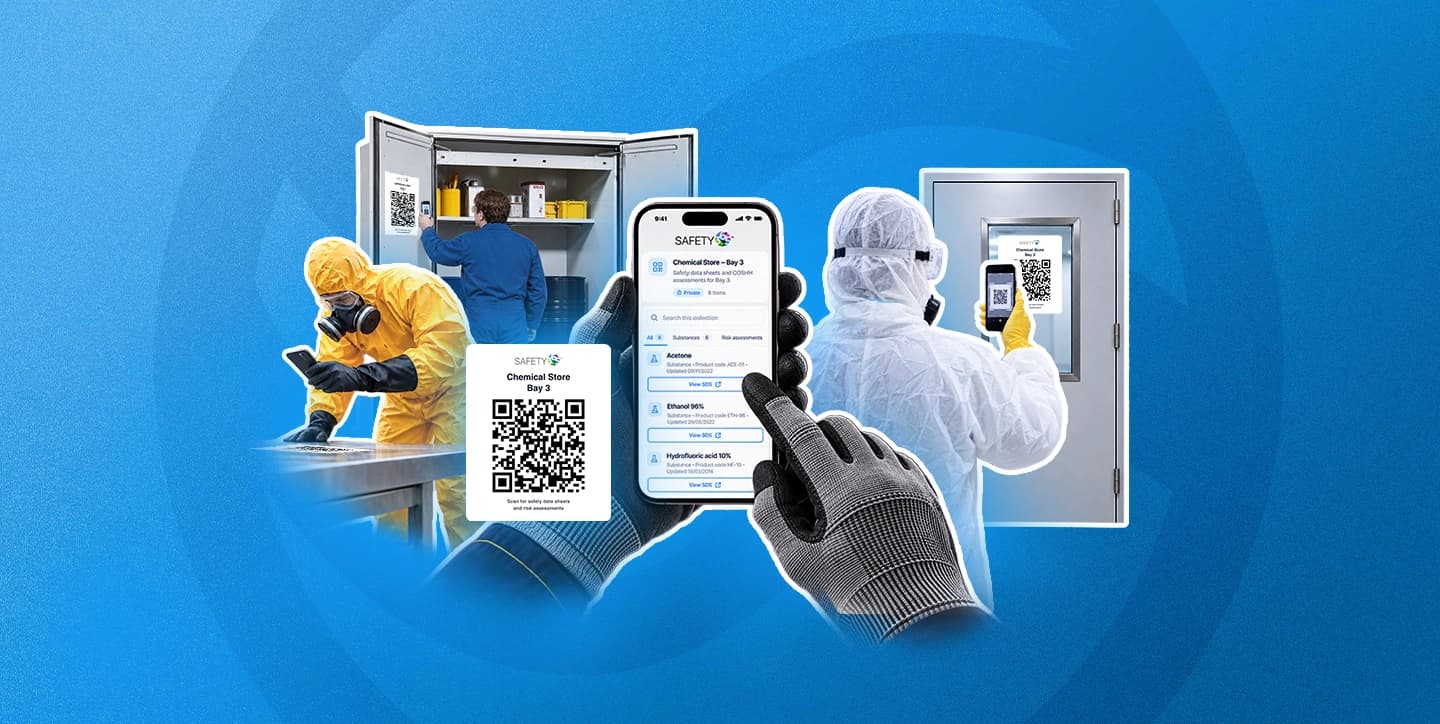
A collection is a group of substances and Risk Assessments, chosen by location or one record at a time, published behind a single QR code. Anyone with access can open it with a phone camera. There is no app to install and nothing for the person scanning to set up. What they get is the current Safety Data Sheet (SDS) for a substance and, if they are signed in, the assessment covering the work in front of them.
Two things make it more useful than a printed link.
The printed code stays the same while the contents change. When you edit a collection and republish it, the code on the wall carries on working and starts showing the new version. A sign goes up once.
It shows published information only. A Risk Assessment still in draft never appears in a collection, however it was added, so nobody at the sign sees working notes.
Worth separating two terms before going further, because they are easy to run together. The collection is the thing you build, name and publish, and it holds the records. The QR code is how somebody opens it. Each collection has one code, and you can print that code as many times as you need.
For health and safety managers, site and store leads, and Control of Substances Hazardous to Health (COSHH) leads in chemical-heavy or multi-site workplaces, the useful part is that none of this creates a second copy of anything. A collection points at the COSHH Assessments built and held in one system and at the Safety Data Sheets you are already keeping current across the business.
Private or public: deciding who sees what
This is the decision to make before building anything, because it is the one that carries consequences.
A private collection asks anyone who is not signed in to sign in first, then returns them straight to the collection. What they see after that depends on their location and role access, which means two people can scan the same sign and see different things. If some items sit outside somebody's access, the page says so, which saves them wondering whether the list in front of them is complete.
A public collection opens for anyone holding the link, with no sign-in. Assessment PDFs and confidential records stay hidden from anyone who is not signed in, whatever the collection settings say. That boundary is fixed.
The practical difference shows up in who you are putting the sign in front of. A chemical store used only by your own team is a straightforward private collection. A delivery bay that contractors reach before they reach reception is the case where public starts to earn its place, and it is also the case to think hardest about. The same logic applies to task-based Risk Assessments for contractors and visitors, where access and accountability travel together.
Publishing, downloading the code, replacing the link and revoking a collection are all separate permissions. Senior roles hold them by default, and a custom role has to be given them deliberately by a Super User, so it is worth checking who in your organisation can publish before the first one goes up.
Warning
Publishing a public collection with Future records switched on means new substances and Risk Assessments added to that location can become publicly visible without anyone reviewing them. Safety365 asks you to confirm at that point. It asks because the combination is the main way a collection can add new records to public view without a person deciding to.
How to set up a QR Collection in three steps
Building one runs through three screens. Nothing is visible to anybody until you publish, and Save draft holds work in progress for as long as you need.
- Details. Name the collection for the place rather than the project, so it reads correctly to somebody standing in front of the sign. "Workshop 2 - Chemical Store" is the right shape. You have up to 160 characters, though short and specific works better than complete. Add an optional description of up to 500 characters, choose Private or Public, and choose what the scan page shows. Location names and grouping, SDS documents and assessment PDFs are all on by default.
- Contents. Add whole locations, individual records, or a mixture of both. A location can be added as this location only, as the location including its sub-locations, or as sub-locations only. Each one shows how many Safety Data Sheets and Risk Assessments it brings with it, so you can see the size of the collection before anyone else does. Future records is off unless you switch it on.
- Review. A summary of what you have built, alongside a "What scanners will see" preview. Read that preview properly. It is the last point at which a public collection is still private.
Then publish, open the QR and sharing tab, and download the code as a print-ready PNG.
What the person at the sign gets is your company logo, the collection name and description, the number of items, and a Private or Public label. Below that sits a search box, filters for All, Substances and Assessments, and a location filter when the collection covers more than one. View SDS opens a Safety Data Sheet. Signed-in users can also select View assessment to open a Risk Assessment. On a public collection, people who are not signed in see each assessment's title, reference, type and review date, but not the assessment itself. Anyone signed in gets more than that depending on their role, including downloading an SDS or opening a record in the inventory.
For organisations coordinating compliance across several sites, the location filter is the part that matters most. One collection can cover a building, and the person scanning narrows it to the room they are standing in.
Keeping a QR Collection current, and switching it off
Three mechanisms keep a collection honest after it goes up, and the difference between them is worth knowing before you need one.
Future records
Off by default. Switch it on for a location and new eligible substances and Risk Assessments appear in the collection once you publish, without anyone touching the sign. This is the setting for a store that takes new products often. It is also the setting to leave alone where you want to approve everything that appears.
Edit and republish
Changes sit as a draft, marked Unsaved or Unpublished changes, and anyone scanning carries on seeing the last published version until you select Publish changes. The printed code is unaffected throughout, which turns putting up a sign into a one-off job. Teams running this work on a spreadsheet will recognise the saving.
Replace QR link and Revoke
Replace QR link issues a new code for a collection that has travelled further than you intended. Revoke switches a collection off for good.
Warning
Replacing the link stops every code you have already printed or shared from working, immediately and without warning to anyone holding one. Download the new code and replace the signs the same day. Revoke cannot be undone either. A revoked collection stays in the list with its full history, so you keep the record, but bringing it back means building a new collection from scratch. The History tab records drafts, publishing, link replacements and revokes, each with the person who did it and the time. It gives you a record to point to when someone asks who changed what.
Three things worth getting right first time
Start private
You can switch a public collection to private later and the code still works, but the signs already up say "No sign-in needed", and anything people have already opened can't be taken back.
Match Future records to the room
Switch it on for stores where new products arrive regularly and nobody wants to remember to republish. Leave it off where the contents are stable and you would rather decide what appears.
Name collections for the place
"Workshop 2 - Chemical Store" tells somebody at the sign they are in the right place before they scan. A project name or a date tells them nothing, and it ages badly.
Frequently Asked Questions
What is a QR Collection in Safety365?
A group of substances and Risk Assessments published behind one QR code, so scanning it opens the current Safety Data Sheets and Risk Assessments for that location.
Do I need to reprint the QR code when I add a new substance?
No, if the location was added with Future records ticked. Otherwise, add the record and select Publish changes. The printed code stays the same either way.
Can I use the same QR code on more than one sign?
Yes. Every code opens the same collection, so one collection can cover several signs around the same area.
Can a contractor see our Safety Data Sheets without a Safety365 login?
Only if the collection is public. A private collection asks them to sign in first, and what they see then depends on their access.
What happens if the QR code is shared more widely than I intended?
Replace QR link creates a new code and stops the old one working immediately. Every printed copy needs replacing.
Why does a scan say "Collection unavailable"?
The collection has been revoked or replaced, or it sits outside that person's access.

Safety & Compliance Experts
The Sevron team brings decades of combined experience in health and safety compliance, risk assessment, and workplace safety solutions.

Reviewed by
Dale Allen
CEO & Founder