SPOT AI: Sevron's AI System for Risk Assessments and COSHH Compliance

SPOT AI works inside Safety365. It helps safety teams draft Risk Assessments, flags every assessment an SDS update affects and answers questions about the organisation's own records and updates them on request. Decisions stay with the person responsible.
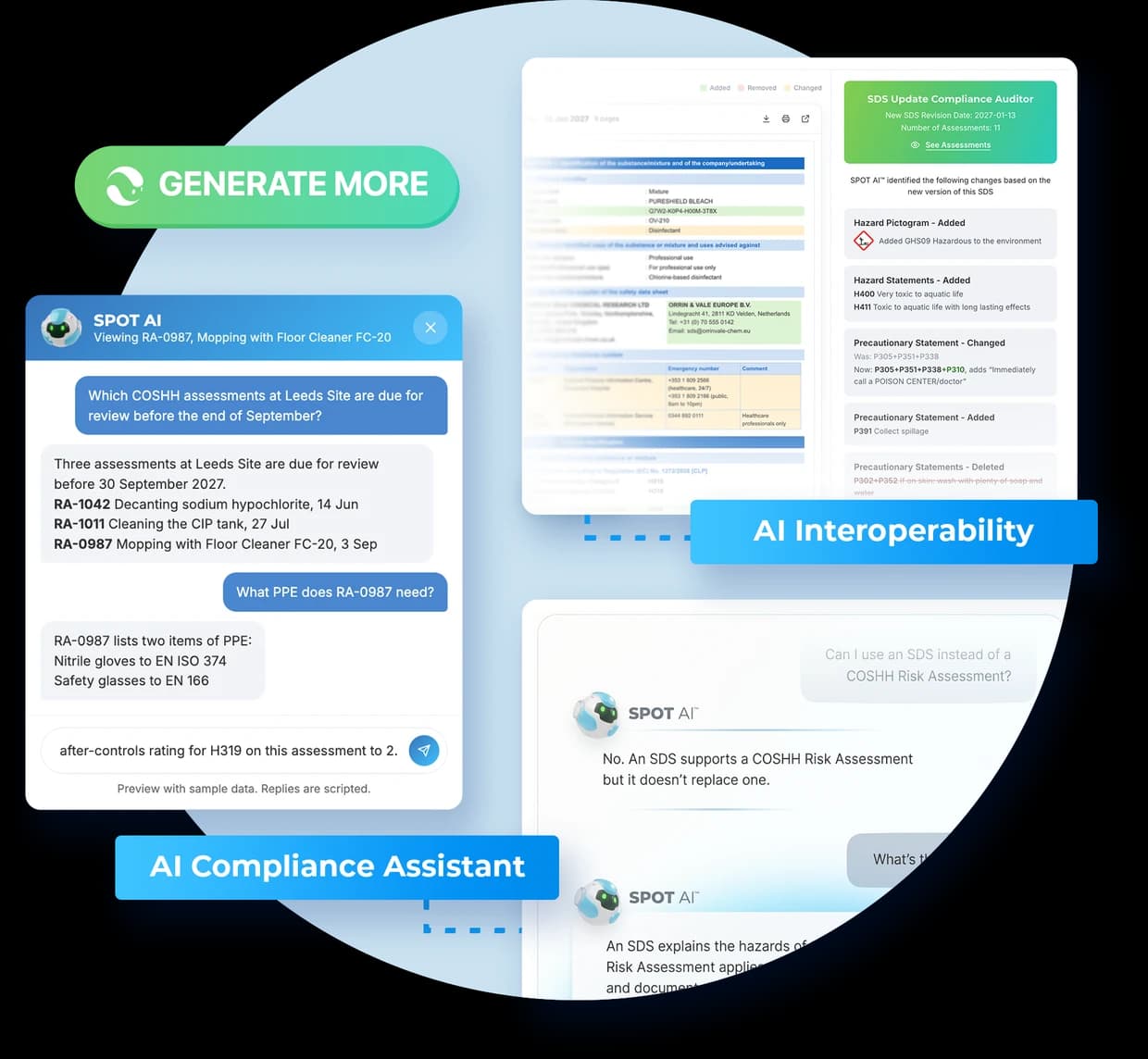
SPOT AI in Safety365: the chat assistant answering questions about assessments, the SDS Update Compliance Auditor listing the changes in a revised Safety Data Sheet, and SPOT AI explaining how an SDS supports a COSHH Risk Assessment

Trusted by 685,800+ users

In over 135 countries, from individual practitioners to global enterprises

  • Transocean
  • JCB
  • Bridgestone
  • Thermo Fisher Scientific
  • University of Leicester
  • Circle Health Group
  • Coca-Cola
  • P&G

Draft faster, catch SDS changes sooner, find records by asking

SPOT AI Assistant

Answers questions and updates records on request

Wizard Assistance

Completes Risk Assessment Wizard sections on request

5-Step Wizard

Starts from a substance, suggests tasks, usage and hazards

SDS Update Auditor

Flags every assessment a revised SDS affects

Assessment Import

Word and PDF assessments carried across

UK Regulatory Lists

SVHC, Annex 14, Annex 17 and GB CMR badges

At a Glance

SPOT AI is Sevron's own AI system, built in-house on twenty years of UK health and safety compliance work. The name stands for Single Point of Truth: SPOT AI answers and helps draft from the substances, Safety Data Sheets, assessments and actions an organisation already keeps in Safety365, so every answer traces back to one maintained source.

It appears in a chat assistant, the Risk Assessment Wizard, the 5-Step Wizard, the SDS Updates area, the substance inventory and the import of existing assessments and SDSs. It works within each user's existing permissions, and anything it helps draft stays a draft until a person reviews and publishes it.

SPOT AI: Built for the People Who Sign Assessments Off

SPOT AI suits safety managers, COSHH assessors and consultants handling dozens or hundreds of assessments across one site or many. Every new substance needs an assessment, every supplier SDS revision can leave one out of date, and every inspector or client request means finding the right record fast. SPOT AI speeds up the first draft, the cross-checking and the searching, and the competent person keeps the judgement.

What is AI COSHH Assessment Software?

AI COSHH assessment software uses AI to help draft a COSHH assessment, or a wider Task Risk Assessment, from the hazard information on a Safety Data Sheet and details of the work. In Sevron's Safety365, that AI is SPOT AI, working from the substances, Safety Data Sheets and assessments the organisation already holds. In an assessment, it suggests tasks, usage details, people affected, hazards, risk ratings and controls. Across the account, it keeps assessments current when an SDS changes, imports existing assessments and SDSs, and answers questions from the organisation's records.

AI in health and safety compliance is still an emerging technology, and Sevron is at its forefront. Built in-house on twenty years of UK compliance expertise, SPOT AI can flag every assessment an SDS update affects and show which reviews fall due at which site, all within the records each user can access.

The duty to assess stays with the employer under regulation 6 of COSHH and the Management of Health and Safety at Work Regulations 1999. SPOT AI helps write and check the draft, and a competent person confirms it fits the work on site, as HSE guidance expects.

PreviewA preview of Safety365 with SPOT AI, shown with sample data

Explore Where SPOT AI Works

Hover over any panel to preview what it shows, or click it to keep it selected. Click it again to deselect.

Your current location:Leeds Site
1Assessment Details
2Task Details
3Substance Information
4Task Hazards & Controls
5General Controls
6Health Surveillance
7Actions
8Linked Documents
9Review & Publish
1

Task Risk Assessment

With COSHH Compliance

Before Controls

High Risk
12

After Controls

Low Risk
04

People affected*

Cleaning operativesCanteen staff

Hazards

H315 Causes skin irritation

H319 Causes serious eye irritation

Wet floor slip risk during and after mopping

PPE

Gloves · Nitrile gloves to EN ISO 374

Eyes · Safety glasses to EN 166

SaveConfirm and Continue
2

Assessment Audit

SPOT AI has identified revisions to this assessment due to an SDS update. Review and apply the necessary changes. Click to generate audit and guide.

Assessment Overview

Assessment owner

Sarah Mitchell

Status

Published, SDS update pending review

3

History Overview

  • 12/05/2027 · SDS update received for Floor Cleaner FC-20
  • 12/05/2027 · Assessment Audit: P280 added, P264 removed
  • 03/03/2027 · Revision 2 published by Sarah Mitchell

View history details

Subscribers

Sarah Mitchell · Site Manager, Leeds Site

James Okafor · Health and Safety Lead

The Risk Assessment Wizard in Safety365 with SPOT AI, shown with sample data. Each numbered panel shows what SPOT AI does there.

Where SPOT AI Works in Safety365

SPOT AI appears in six places, each switched on separately, so an organisation can use one without the others.

Complete the Full Risk Assessment Wizard With SPOT AI

With the full Risk Assessment Wizard open, users can ask SPOT AI to complete parts of it, including task details, hazards, general controls, health surveillance, linked SDSs, documents and people affected. It writes into the form, names the section it updated and flags any unsaved edits it replaced. Saving and publishing stay with the user.

The interactive preview above shows SPOT AI at work in this wizard.

SPOT AI Assistant: Answers From the Organisation's Records

The assistant opens from a button in the top bar. It answers questions such as which substances at a site lack a Safety Data Sheet, which assessments fall due this quarter or which actions remain open, drawing on the records in the account.

It can also act: helping build a draft COSHH assessment from an attached SDS, helping draft Task Risk Assessments from a description, updating ratings on several hazards at once and adding substances. It summarises each change and waits for confirmation before saving, and destructive changes and bulk export are outside its reach. When it can't help, it hands over to live support with a summary.

Read the SPOT AI assistant help article

The SPOT AI 5-Step Wizard: A Free AI Risk Assessment Tool for COSHH

The SPOT AI 5-Step Wizard is the shortest route from a substance to a draft COSHH assessment, and it is free. Each step builds on the one before.

  1. 1SubstanceA search, or a pick from the industry's most common substances, followed by the SDS.
  2. 2TaskA task SPOT AI suggests for that substance, or a custom task with the description filled in by SPOT AI.
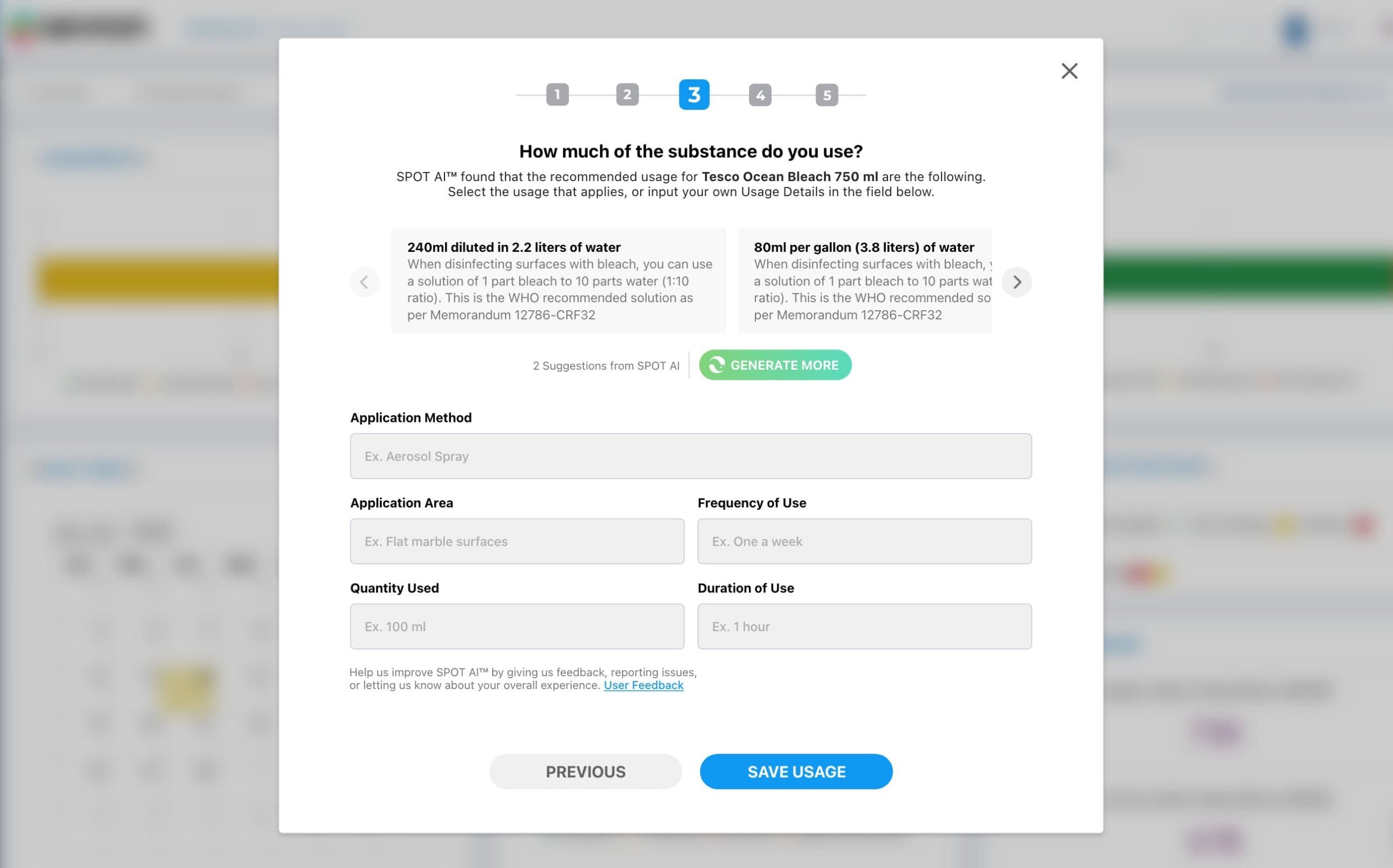
  3. 3UsageApplication method, area, frequency, quantity and duration, with recommended values filled in.
  4. 4People affectedSPOT AI suggests who is likely to be exposed, and the assessor adds anyone missing.
  5. 5Hazards and controlsHazards arrive pre-selected with before and after risk ratings from the company's own risk matrix, ready for controls and safety signs.
Step 3 of the SPOT AI 5-Step Wizard, asking how much of the substance is used, with two usage suggestions from SPOT AI and fields for application method, area, frequency, quantity and duration
Step 3 of the 5-Step Wizard: SPOT AI suggests usage for the chosen product, and the user picks one or enters their own.

SPOT AI can also suggest the safe system of work, workplace exposure limits (WELs), general controls and health surveillance. The result saves as a draft that can be reviewed and published within the 5-Step Wizard, or opened in the full Risk Assessment Wizard for more detail.

It runs inside Safety365, and a free AI Risk Assessment tool on the Sevron website runs the same five steps without an account and emails a summary of the draft.

Keep COSHH Assessments Current When an SDS Changes

Under UK REACH, suppliers must issue an updated SDS when new hazard information comes to light, and one added hazard statement can leave every assessment using that substance out of date.

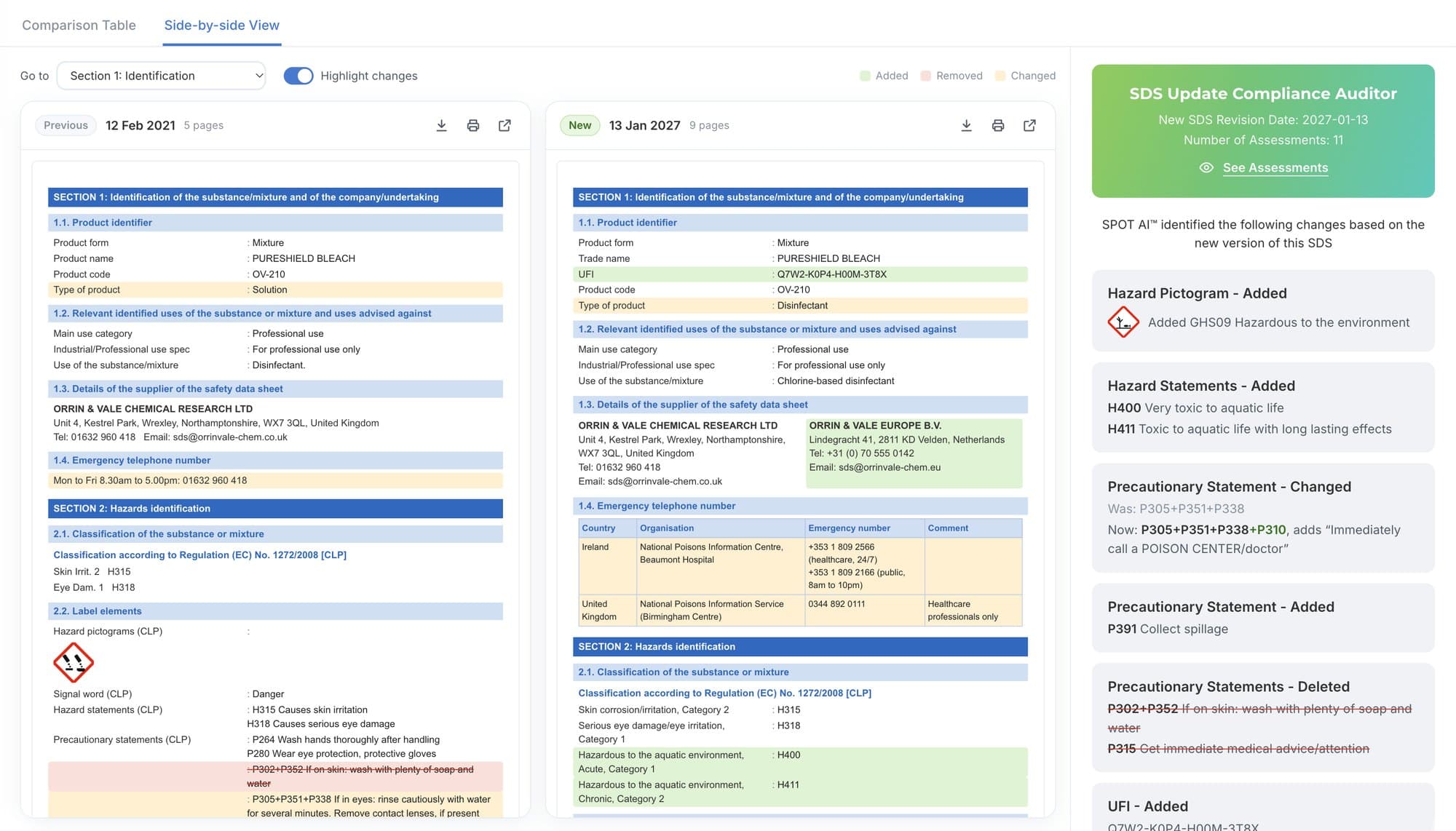
When an update reaches a Safety365 SDS inventory, SPOT AI compares the two versions across hazard pictograms, H statements and P statements and lists what was added or removed. The comparison follows fixed rules, so the same two SDSs always give the same result, as the SDS comparison help article explains.

The SDS Update Compliance Auditor in Safety365, showing the previous and new Safety Data Sheet side by side, with the changes SPOT AI identified listed in a side panel
The SDS Update Compliance Auditor sets the previous and new Safety Data Sheet side by side and lists the changes SPOT AI found.

Once the update is accepted, SPOT AI opens an Assessment Audit on every assessment that uses the SDS. Pictogram and P statement changes apply automatically, and hazard statement changes wait for a person because they can change the risk. Every decision is kept in the assessment's Audit History.

Bring Existing Risk Assessments and Safety Data Sheets Into Safety365

A Risk Assessment in Word or PDF can be uploaded and carried into Safety365 with its before-control and after-control risk ratings, then saved as a reusable template. Safety Data Sheet uploads work the same way: SPOT AI reads the sheet and pulls its data into Safety365.

Read the SDS upload help article

UK Regulatory List Badges

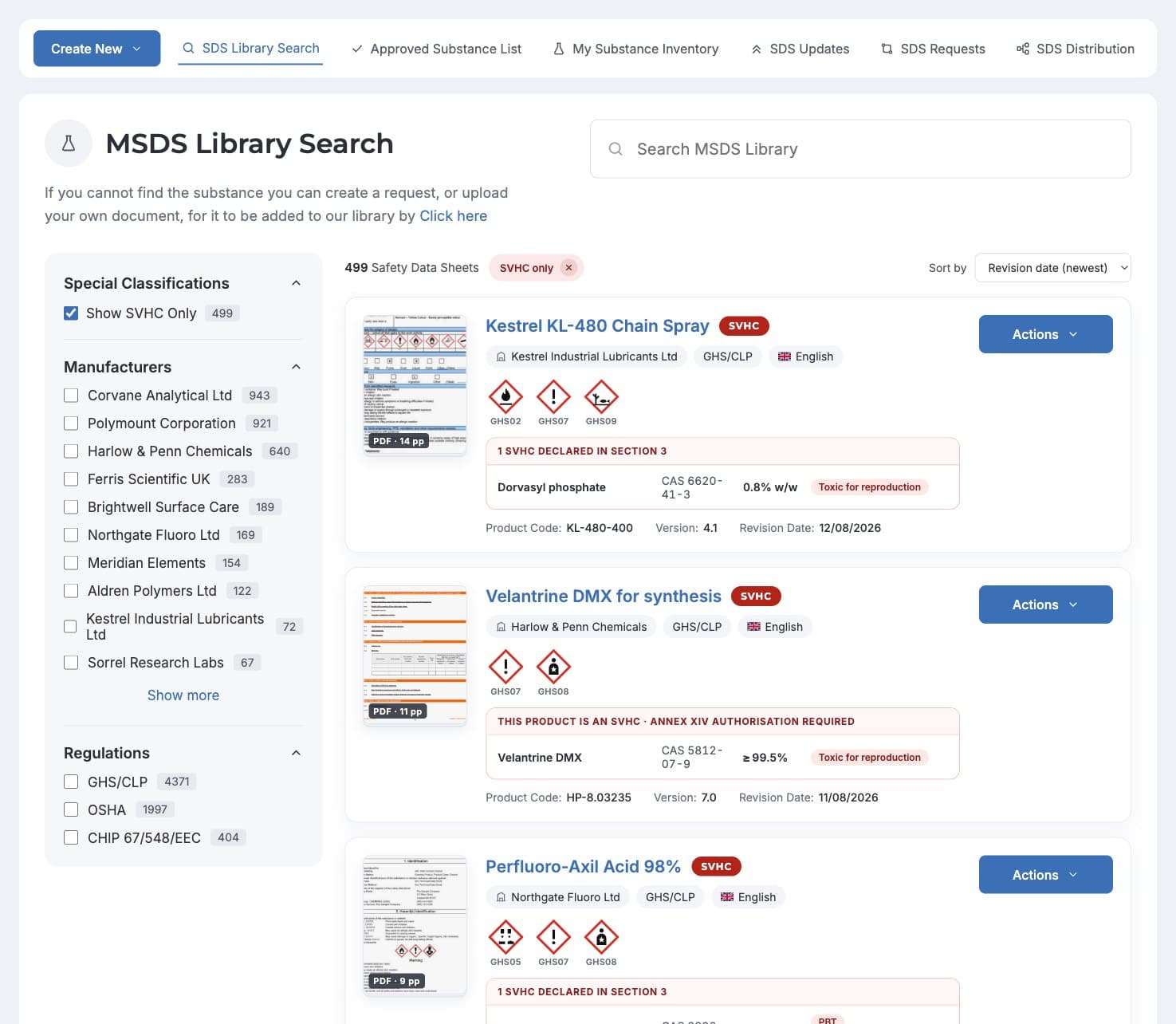
SPOT AI checks each Safety Data Sheet against the UK SVHC, Annex 14, Annex 17 and GB CMR lists and tags the substance with a badge for every list it appears on. The inventory filters by list, the badges show in the Risk Assessment Wizard, and substance exports include a regulatory lists column.

Read the SVHC tags help article
SDS Library Search in Safety365 filtered to SVHC only, with SVHC badges on each substance and the SVHC declared in section 3 of each Safety Data Sheet
SDS Library Search filtered to SVHC only, showing each SVHC declared on the Safety Data Sheet against the product.

What SPOT AI Does, and What Stays With the Competent Person

SPOT AI suggests, compares, imports, finds and answers. Judging whether the result fits the work stays with the person responsible for it.

WhereWhat SPOT AI doesWhat stays with the competent person
SPOT AI AssistantAnswers from the organisation's records and helps draft and update assessments, actions and substances. Destructive changes and bulk export are outside its reachConfirming each change before it is saved
Risk Assessment WizardCompletes sections on request, from task details to health surveillance, and flags any unsaved edits it replacedSaving, reviewing and publishing the assessment
5-Step WizardSuggests tasks, usage, people affected, hazards and controls for the chosen substance, with ratings from the company's own risk matrixReviewing and publishing the draft, in the 5-Step Wizard or, for more control, the full wizard
SDS Update Compliance AuditorCompares SDS versions, applies pictogram and P statement changes, opens an audit on each affected assessmentDeciding on every hazard statement change and completing the audit
Assessment and SDS importCarries Word and PDF assessments into Safety365 with their before and after ratings, saves them as reusable templates and reads uploaded SDSs into the inventoryChecking imported ratings against the work done on site
Regulatory list badgesTags each substance with the UK lists it appears onDeciding what controls a listing calls for

Permissions, Privacy and Who Controls Access

SPOT AI sees only what its user can see. Permissions are enforced on the server, so a site supervisor asking about another region's records gets nothing back, and the boundaries already set across a multi-site organisation hold.

Super Users switch SPOT AI on or off for the company, or limit it to chosen roles, from System Settings. First-time users see a privacy notice explaining that conversations are recorded and stored, and every answer can be rated.

Save Time & Money vs. Manual Drafting and Checking

SPOT AI speeds up the first draft, compares every SDS revision and finds the record being asked for, so the time saved on retyping and searching goes to review.

*Estimates based on a £24.93/hour rate and a mid-size organisation across 3 sites with 40 new COSHH assessments, 60 SDS revisions, about 4 record questions a week and 50 existing assessments imported each year

TaskManual ProcessSevron SystemTime SavedCost Saved
First-Draft COSHH AssessmentsWritten from the SDS by handDrafted with SPOT AI's suggestions80 hrs£1,994
SDS Update ReviewsTwo versions compared line by lineChanges listed by code, affected assessments flagged75 hrs£1,870
Finding Records and AnswersSearching screens and sitesAsked in plain English90 hrs£2,244
Existing AssessmentsRetyped into the systemImported from Word or PDF42 hrs£1,047
Overall336 hrs49 hrs287 hrs£7,155/year

Trusted by 685,800+ users

In over 135 countries, from individual practitioners to global enterprises

  • Transocean
  • JCB
  • Bridgestone
  • Thermo Fisher Scientific
  • University of Leicester
  • Circle Health Group
  • Coca-Cola
  • P&G

Frequently Asked Questions

Can AI write a COSHH assessment?

AI can help write a draft. In Safety365, SPOT AI uses the hazard data on the Safety Data Sheet and the task details to suggest usage, people affected, hazards, risk ratings and controls. Whether the draft matches how the substance is used on site is for a competent person to judge before publishing.

Is an AI-generated COSHH assessment legally valid in the UK?

The law tests whether an assessment is suitable and sufficient, and it does not set how one is drafted. Under regulation 6 of COSHH 2002 the duty sits with the employer, and HSE expects a competent person to carry out the assessment. An AI draft that a competent person has reviewed, corrected where needed and signed off can meet that standard. An unreviewed draft should not be relied on.

How is SPOT AI different from using ChatGPT for a Risk Assessment?

A general-purpose chatbot works from general knowledge and whatever is pasted into it. It holds none of an organisation's substances, SDS versions, risk matrix or existing assessments, and its output has to be keyed into the records by hand. SPOT AI works inside Safety365 and suggests each part of an assessment in the form itself: task details, usage details, people affected, hazards, controls, workplace exposure limits and health surveillance, with risk ratings from the company's own risk matrix. It flags substances on UK regulatory lists such as SVHC and GB CMR, saves against the right substance and location, and stays within each user's permissions.

What happens when SPOT AI gets something wrong?

Nothing SPOT AI suggests is published without a person. Drafts stay drafts until someone reviews and publishes them, and the wizard names the section it wrote into, so every change can be found. The assistant summarises what it will change and waits for confirmation, which is where a wrong instruction gets stopped. SDS update changes apply only after someone accepts the update, and hazard statement changes wait for a person to decide. Where SPOT AI cannot help, it hands over to live support with the conversation summarised.

Which AI tool is best for health and safety Risk Assessments?

The best test is how a tool handles an organisation's own records: whether it works from the organisation's own Safety Data Sheets and records, uses the company's risk matrix, enforces permissions in the system, confirms each change before saving and records who changed what. SPOT AI does all five.

What does AI workplace safety software do for COSHH compliance?

An effective one takes on the checking and record-finding that slows compliance work down, among other capabilities. In Safety365, SPOT AI answers questions and acts on records through its chat assistant, flags every assessment a revised Safety Data Sheet affects, imports existing assessments and SDSs, and shows UK regulatory list badges on substances. In assessments, it suggests tasks, usage details, people affected, hazards, risk ratings and controls. On the Sevron website, the free COSHH Management Mock Inspection uses SPOT AI to rate an organisation's COSHH management. The final decisions stay with the competent person.

Is there a free AI Risk Assessment tool for COSHH?

Yes. The SPOT AI 5-Step Wizard is free inside Safety365 and on the Sevron website, where it runs without an account and emails a summary of the draft COSHH assessment. Two more SPOT AI tools on the Sevron website are free: the chatbot, for general questions about Sevron and Safety365, and the COSHH Management Mock Inspection, which rates an organisation's COSHH management and suggests next steps.

Is the chatbot on the Sevron website the same as SPOT AI in Safety365?

Both are SPOT AI. On the Sevron website it is free, answers general questions about Sevron and Safety365 and has no connection to any customer account, so it cannot see anyone's records. Inside Safety365 it answers from the organisation's own records, within the permissions of the person asking.

"The smartest thing in safety since common sense"

Dale Allen, Founder, Sevron

Dale Allen, Founder of Sevron and host of the Safety-Verse